What Is an Image URL? Definition and Examples
An image URL is a web address that points directly to an image file. When a browser or app opens it, the server returns an image instead of an HTML page that merely contains the image.
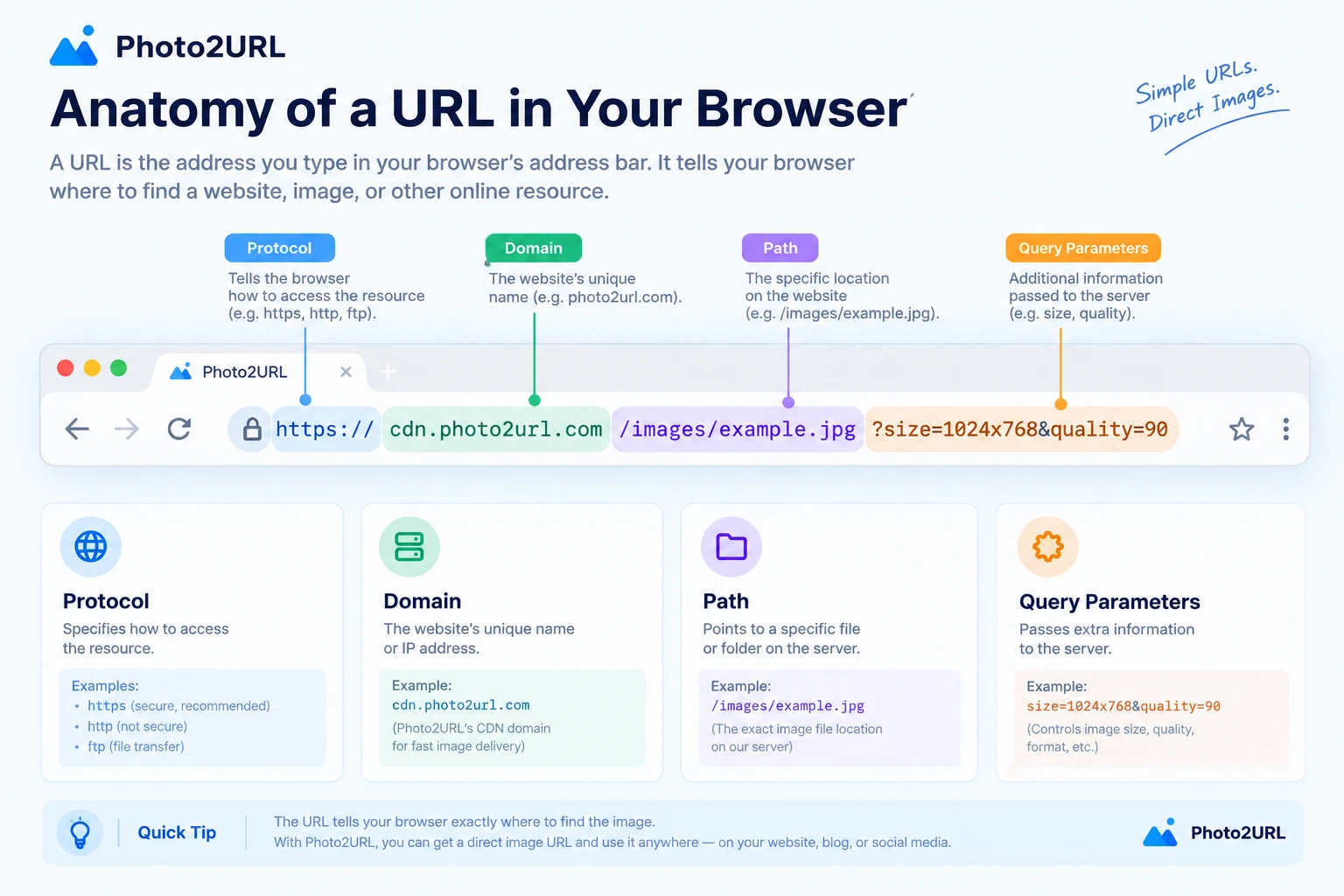
What Is an Image URL?
An image URL is a specific type of URL whose destination is an image file, such as a JPEG, PNG, WebP, GIF, or SVG. The address can identify an image stored on a web server, an object storage service, or a content delivery network.
The term direct image URL emphasizes that the address returns image data itself. It does not open a gallery page, an article, or a download page that wraps the image in other content.
An image URL can end with a file extension such as .jpg or .png, but it does not have to. Some image services use extensionless paths and identify the file format through response headers instead.
Image URL Examples
The following examples use example.com, a domain reserved for documentation, so they are safe placeholders rather than live image addresses.
- Direct image URL:
https://cdn.example.com/photos/team.jpg - HTML image:
<img src="https://cdn.example.com/photos/team.jpg" alt="Team meeting"> - Markdown image:

In each example, the URL points to the image file. The HTML and Markdown snippets only describe how a page should display that image.
Direct Image URL vs. Image Page URL
A page URL and a direct image URL can look similar, so it helps to compare what each one returns:
- Image page URL: returns an HTML document that may contain the image, captions, navigation, advertisements, or other page elements.
- Direct image URL: returns the image file itself, usually with a content type such as
image/jpegorimage/png.
This difference matters when another website, app, or document expects an image. If it receives an HTML page where it expects image data, the image may fail to display even though the page URL works in a browser.
How Image URLs Work
When a browser or app loads an image URL, a short request and response cycle takes place:
- The client reads the URL and finds the server hostname.
- It requests the path and any query parameters from that server.
- The server or CDN returns the image bytes and response headers.
- The browser decodes the image data and renders the picture.
A CDN can cache an image close to the people who request it, so the same URL may be served from different edge locations. From the user's perspective, however, it remains one stable address.
Access rules also affect whether an image URL works for everyone. A private file may require authentication, a signed URL may expire, and a host may block external sites from loading its images. A technically valid URL can therefore still stop working outside its intended context.
Common Uses for Image URLs
HTML Websites
HTML uses the src attribute to load an image URL. The alt text describes the image when it cannot be seen or when assistive technology reads the page:
<img src="https://cdn.example.com/photos/team.jpg" alt="Team meeting">Markdown Documents
Markdown combines alt text with the image URL in a compact format. This is common in README files, documentation, issues, and note-taking apps that support image rendering:
Apps, CMS Platforms, and Data
Applications often store an image URL as a value in a database record. Product photos, profile pictures, article thumbnails, and user uploads can then be displayed by passing that URL to an image component. If you already have a URL and only need copy-ready markup, use the image URL generator.
Image URL vs. Website URL
A website URL normally identifies an HTML page designed to be viewed in a browser. An image URL identifies a media resource that can be displayed on its own or embedded inside another page. Both are URLs, but their destinations serve different purposes.
For a broader explanation of schemes, domains, paths, and query strings, see What Is a URL? A Simple Guide to Web Addresses.
Frequently Asked Questions
What is an image URL in simple terms?
An image URL is a web address that points to an image file. When the address is opened, the server returns image data that a browser or app can display directly.
Is an image URL the same as an image link?
Usually, image link is an informal name for an image URL. Strictly speaking, the URL is the address, while a link is the clickable text, image, or button that points to that address.
Does an image URL need to end in .jpg or .png?
No. A file extension is a useful clue, but it is not required. What matters is that the server returns the resource with an image content type, such as image/jpeg or image/png.
Can I use an image URL in HTML and Markdown?
Yes. Put the image URL in the src attribute of an HTML img element, or place it inside Markdown image syntax. The same URL can be reused in both formats.
Why does an image URL sometimes stop working?
The image may have been moved or deleted, a temporary link may have expired, or access may require a login. Some hosts also block images from being loaded on other websites.
Conclusion
An image URL is the address of an image file on the web. It can carry the same scheme, domain, and path structure as any other URL, but its response contains image data rather than a complete web page. That direct destination is what lets the image appear in HTML, Markdown, apps, and online documents.
To learn more about the product, visit Photo2URL. If you are ready to create a direct URL, go directly to the image-to-URL tool to upload an image.
For the full upload workflow, including how to use the result in Markdown and HTML, see How to Get an Image URL.
Need a direct URL for an image?
Upload or paste an image and get a shareable direct URL with copy-ready HTML and Markdown.