How to Create an Image URL for Your Website
When I build a website, I usually already have the image file. What I need next is an address the browser can request. A local filename cannot do that job, and neither can a web page URL that merely displays the image inside a layout. A website needs an image URL that returns the image resource itself.
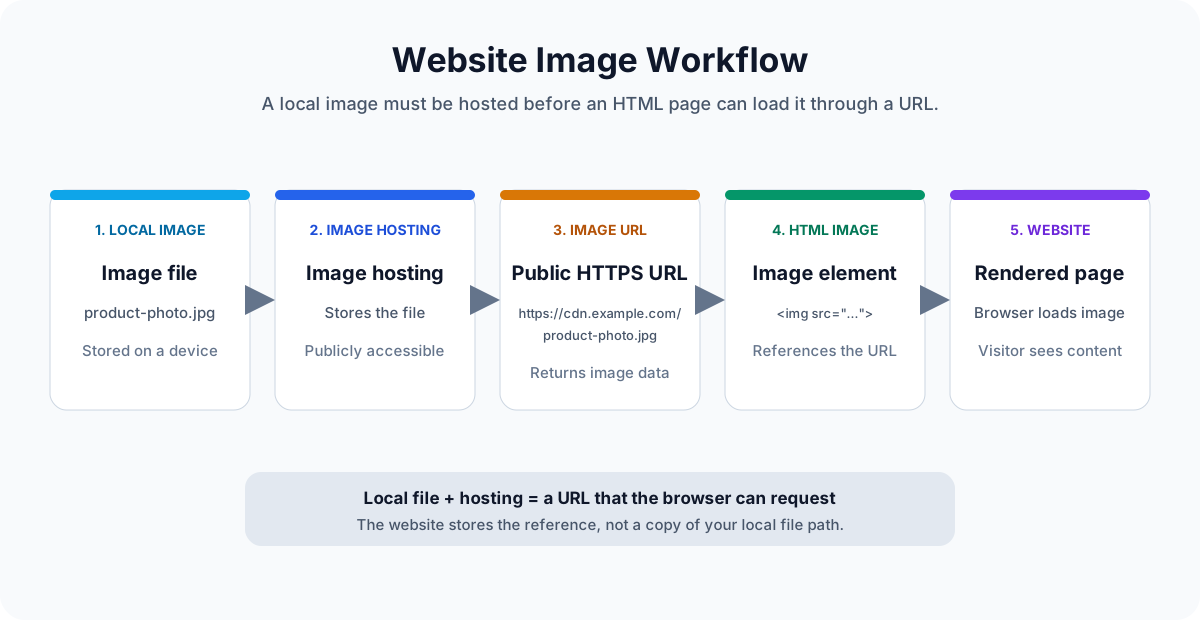
What Is an Image URL for a Website?
An image file, an image URL, and a web page URL are related, but they are not the same thing.
- Image file: the picture stored on your computer, phone, or another device. A filename such as
product-photo.jpgidentifies a local file, but it does not give a website a way to fetch that file from your device. - Image URL: a public web address that returns the image resource directly, such as
https://example.com/image.jpg. The response should contain image data rather than an HTML page. - Web page URL: an address that returns an HTML document, such as
https://example.com/product. The page may display an image, but the URL itself is not the image resource.
A website uses the image URL in an image element or other media reference. When the page loads, the browser follows that address and requests the image bytes. This is the same direct-resource distinction explained in the guide to what an image URL is.
Why Websites Need Image URLs
Any website that displays images needs a stable way to locate those files. The exact context changes how the URL is managed, but the browser still needs an address it can request.
- Blog articles: a cover image, inline screenshot, or diagram can live outside the article database and be loaded through an image URL in the rendered page.
- Ecommerce product pages: product photos often appear at several sizes and in multiple views, so their URLs may also be used by templates, feeds, and marketing systems.
- Landing pages: hero images, feature graphics, and testimonial portraits can be delivered from the same host as the page or from an image CDN.
- Documentation websites: screenshots and diagrams need URLs that remain available when documentation is built, deployed, or rendered by a different system. The guide to hosting images for Markdown covers that workflow in more detail.
- Portfolio websites: project images may be stored separately from the application code, making it easier to update the portfolio without rebuilding every asset.
When a browser parses an image element, it sends a separate request for the URL in the image source. The server responds with image bytes and headers such as the content type. The browser can then decode and display the result. If the URL returns a login page, a 404 response, or ordinary HTML instead of image data, the image cannot render correctly.
Common Ways to Create an Image URL
There is no single hosting method that is best for every website. The useful choice is the one that matches the project's access, retention, and maintenance needs.
1. Host Images on Your Own Server
If you control a web server, you can place an image in a public directory and serve it from your own domain. For example, an image saved as public/images/product-photo.jpg might be available at https://example.com/images/product-photo.jpg. This approach gives you full control over file organization, caching, access rules, and deployment.
It also makes you responsible for the infrastructure. You need storage, a web server or CDN configuration, backups, image optimization, and monitoring for broken files or changed paths. A relative path such as /images/product-photo.jpg can work when the image is served by the same site, but an absolute URL is often clearer when the address will be reused elsewhere.
2. Use Cloud Storage
Cloud object storage can serve images without keeping them inside the website deployment. The storage service usually provides a URL for each object, and a CDN can be placed in front of it for delivery. This can be flexible for growing media libraries and for assets used by several applications.
The tradeoff is configuration. Bucket permissions, public access, custom domains, cache headers, lifecycle rules, and signed URLs all affect whether the image works as expected. A private object is not a useful direct image URL for a public web page unless the page has a supported authentication flow.
3. Use an Image Hosting Service
An image hosting service stores the file and provides a public HTTPS URL for it. That can be convenient when you need a quick image URL for a website, Markdown document, README, or documentation page without setting up a server or storage bucket.
Before relying on any host, review its retention policy, privacy controls, deletion behavior, usage limits, and terms. The important technical property is a direct image URL that remains accessible without a visitor signing in.
How to Create an Image URL with Photo2URL
Photo2URL turns a local image file into a public image URL without requiring you to configure a web server or storage bucket. The workflow is short:
- Start with the image file on your computer or phone.
- Upload the image to Photo2URL.
- Generate the public image URL.
- Copy the HTTPS image URL, or use the ready-to-copy HTML version if you need an image element.
- Use the URL on a website, in documentation, or in Markdown.
The Image to URL tool is the primary workflow for a single image. If images are generated by a build process or another application, the Photo2URL developer API is the programmatic option.
Ready to create an image URL?
Upload an image and copy a direct HTTPS URL that is ready for your website or another online document.
How to Add an Image URL to HTML
Once you have a direct image URL, the HTML itself is simple:
<img src="https://example.com/image.jpg" alt="Example image">The src attribute holds the image URL. The browser requests that resource and places the returned image in the layout. The alt attribute is a short description of the image's purpose. It can appear when the image fails to load, and assistive technology may use it when describing the page.
Use descriptive alt text instead of repeating the filename. For example, alt="Red running shoe" is more useful than alt="shoe.jpg". If the image is purely decorative, the page may use an empty alt attribute, but meaningful content images should have a useful description.
If the image needs to open another page when clicked, wrap the image element in a link and choose the destination separately. The HTML image link generator can help assemble that markup without changing the image URL.
Common Image URL Problems
- Using a webpage URL instead of an image URL: A gallery or product page returns HTML, not the image. Open the address in a new tab and check whether it shows only the image. Use the direct image resource URL in the
srcattribute. - Private images that require a login: A browser loading an image element will not automatically sign in for a visitor. Use a public asset when the image can be shared, or provide an authenticated application flow for private media.
- Deleted images: Moving or deleting a file breaks every page that references its old URL. Keep backups, use stable file names, and update references before removing the original asset.
- Expired hosting links: Temporary signed URLs and services with short retention rules can stop working later. Use a stable public URL for long-lived website content and check the host's retention policy before publishing.
- Incorrect file paths: Check the full URL, capitalization, protocol, and URL encoding. A space in a filename may need to be encoded as
%20, and a relative path is resolved from the location of the HTML page, not from your computer's file browser.
Frequently Asked Questions
These are the practical points to check when an image URL needs to work outside your local development environment.
Website image URL questions
How do I get an image URL?
Upload the image to a web server, cloud storage service, or image hosting service that provides public direct links. Then copy the URL that returns the image itself rather than a page that contains the image.
Can I use any image URL on my website?
No. The URL should remain publicly accessible, return an image content type, and work without a visitor signing in. A temporary signed URL can work for a short-lived preview, but it is usually a poor fit for a long-term website image.
What is the difference between an image URL and an image link?
An image URL is the address of the image resource. An image link is the clickable or displayable element that points to that address, such as an HTML img element or Markdown image syntax.
How do I add an image URL in HTML?
Place the image URL in the src attribute of an img element. Add useful alt text so the page remains understandable when the image cannot load or when assistive technology reads the content.
Do image URLs expire?
A stable public URL normally remains available until the file is moved or deleted, the host changes access rules, or the service is discontinued. Temporary signed URLs can expire much sooner.